Christmas Digital Paper Patterns: A Practical Resource for Seasonal Design
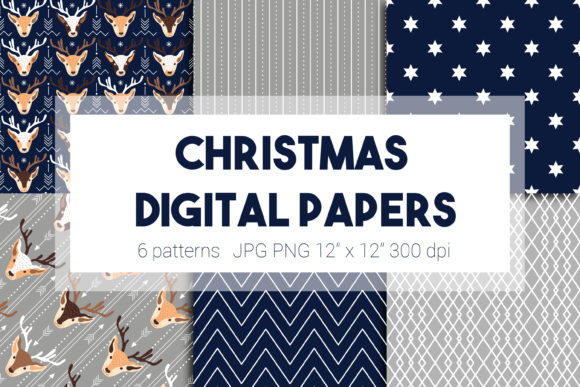
At its core, a Christmas digital paper pattern is a high-quality, downloadable graphic file designed to mimic traditional patterned paper. Unlike physical wrapping paper or scrapbook sheets, these are digital assets—typically JPG or PNG files with seamless, repeating designs—created for use in digital and print projects. For professionals, creators, and hobbyists managing seasonal workflows, these patterns are not merely decorative elements; they are versatile components that integrate into a broader design and content creation process.
Understanding where Christmas digital paper patterns fit requires viewing them as raw material. They sit at the beginning of a creative or production pipeline, similar to stock photography or font selections. Their value lies in their application across various mediums and platforms. A marketer might use them as backgrounds for social media campaigns, an educator might incorporate them into holiday worksheet designs, and a small business owner might utilize them for crafting consistent seasonal branding for product packaging or website banners.
Integrating Patterns into Pre-Production and Planning
The effective use of Christmas digital paper patterns begins before any design software is opened. This phase involves selection and asset organization. A practical approach is to curate a library of patterns aligned with your brand’s color palette or project’s theme. For instance, a blogger planning a month of holiday content might gather a mix of traditional red-and-green patterns, minimalist winter motifs, and modern metallic designs in a dedicated folder. This pre-collection saves significant time during the execution phase, allowing for quick iteration and consistency across multiple outputs.
Considerations of compatibility and resolution are crucial here. Patterns intended for web use might require smaller file sizes and specific color profiles, while those for high-quality print merchandise, like greeting cards or fabric, demand high-resolution files with a minimum of 300 DPI. Checking these specifications during acquisition prevents quality control issues later. Organizing these assets with clear naming conventions—such as “Christmas_Pattern_Scandinavian_Red_300DPI”—streamlines retrieval and fosters efficiency, especially when collaborating with team members or clients.
Workflow Examples: From Asset to Finished Product
To move from concept to implementation, let’s examine a few concrete workflow examples. A freelance graphic designer tasked with creating a holiday newsletter for a client would first establish the layout and copy. The chosen Christmas digital paper patterns might serve as subtle background elements for section headers or as full-page borders. Using layer masks and opacity adjustments in software like Adobe Photoshop or Canva, the designer integrates the pattern without overwhelming the text, ensuring readability and a professional finish.
For a productivity-minded user running a small Etsy shop, patterns become part of a production line. They might be imported into a digital cutting machine software to design printable stickers or used within a word processor template to create matching gift tags for physical products. Here, the pattern interacts directly with other tools: the cutting machine, the printer, and the physical inventory. Batch-processing these items by using the same pattern set for all seasonal listings creates a cohesive brand experience for customers.
Execution and Application in Diverse Projects
During the active project phase, Christmas digital paper patterns function as adaptable layers. Their seamless nature means they can be tiled to cover any area size, from a small Instagram post to a large poster. A key practical tip is to master the basic transformation tools in your design platform. Scaling a pattern without distorting its quality, or cropping it to create a unique focal point, expands its utility. For digital marketers, a single pattern file can be repurposed across an entire campaign: as a video background, a blog post graphic, and an email header, ensuring visual consistency that reinforces campaign messaging.
Interaction with other assets is fundamental. Patterns rarely exist alone; they combine with fonts, icons, photographs, and logos. The usability of a pattern is often determined by how well it complements these elements. A busy, highly detailed pattern might clash with intricate typography, whereas a simple, dotted pattern could provide perfect contrast. Testing these combinations in a low-fidelity mockup before finalizing designs is a simple step that safeguards the project’s overall quality.
Enhancing Efficiency and Maintaining Consistency
For teams and individuals managing multiple holiday projects, efficiency gains are realized through template creation. Save a document layout with your chosen Christmas digital paper patterns already placed as locked background layers. Every new project file opened will inherit that seasonal styling, drastically reducing setup time. This method is particularly useful for educators creating weekly holiday activity sheets or publishers working on a series of seasonal digital magazines.
Consistency, a cornerstone of professional output, is easier to maintain with a defined pattern library. When all team members access the same curated set of Christmas digital paper patterns from a shared cloud drive or asset manager, the risk of stylistic deviation diminishes. This controlled approach to asset management supports brand integrity and presents a unified visual identity to the audience, whether that audience is students, readers, or clients.
Long-Term Use and Post-Project Asset Management
The lifecycle of a Christmas digital paper pattern extends beyond the December rush. Thoughtful post-project asset management turns seasonal resources into a reusable investment. Archiving used patterns with notes on their application—which project they were used for, how they performed in print, any client feedback—builds a knowledge base for future planning. This practice aligns with long-term workflow optimization, allowing you to refine your selections year after year.
Furthermore, many patterns have timeless elements. A classic wreath motif or a snowy Scandinavian design can be adapted for winter campaigns that extend into January. Slightly altering the color scheme of a pattern in your graphics software can also repurpose it for other seasonal events, like Valentine’s Day or autumn festivities, maximizing the return on your initial resource gathering effort.
Integration into a personal or business routine is about making the resource accessible and logical. Embed the use of digital patterns into your standard project kickoff checklist. When “select seasonal visual assets” is a defined step alongside “define project goals” and “outline content,” it becomes a natural part of the process rather than an ad-hoc search. This institutionalizes creativity and ensures that the practical benefits of using Christmas digital paper patterns—speed, consistency, and professional polish—are reliably delivered in every holiday-related task you undertake.
Ultimately, these digital patterns are more than just pretty backgrounds. They are workflow components that, when understood and implemented with a process-oriented mindset, reduce friction in seasonal production, enhance the quality of creative outputs, and provide a scalable solution for delivering holiday cheer across digital and physical mediums. By treating them as strategic assets from acquisition through to archiving, you harness their full potential to support your goals, whether you’re crafting a single greeting card or orchestrating a complex multi-channel marketing campaign.